Invoices and billing
Every subscription charge creates a Stripe invoice. Companies billed in Brazil also get a Brazilian tax document (NFS-e) for each payment. This guide shows where to find and download these documents.
Who can do it: The Owner and Admin users.
The invoice list
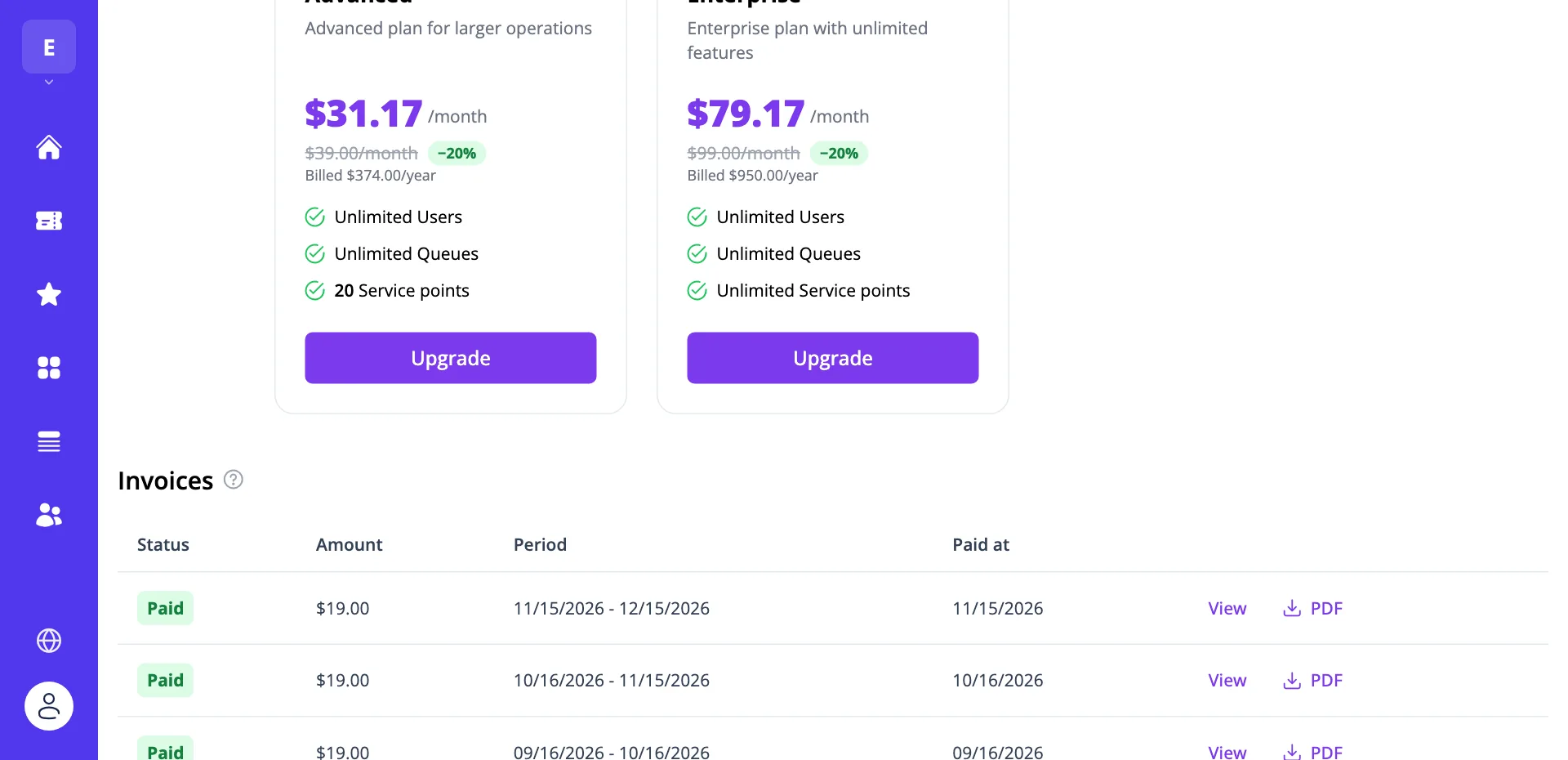
The Invoices list is at the bottom of the Billing screen. It shows the Status, Amount, Period and Paid at of each invoice. On a phone, each invoice is shown as a card.
- Open the company switcher in the side menu and click Billing.
- Scroll down to Invoices.
- Click the ? 1 to see what each status means.
- Click View 2 to open the invoice on the Stripe page.
- Click PDF 3 to download the invoice as a PDF.
- Check Paid at 4 to see when each invoice was paid. Companies billed in Brazil also get NFS-e actions on each row.
What each status means
| Status | Meaning |
|---|---|
| Paid | Invoice paid successfully. |
| Open | Invoice issued and awaiting payment. |
| Draft | An invoice Stripe hasn't issued yet. It can still be adjusted and is only charged once issued. Usually temporary. |
| Uncollectible | Invoice marked uncollectible: the payment was not completed. |
| Void | Invoice voided or cancelled. It won't be charged. |
Billing e-mails
Invoice, receipt and payment-reminder e-mails are sent by Stripe, the payment platform, not by Reserve Digital. Look for Stripe senders in your inbox and spam folder.
The Billing e-mail is part of the company's tax details. To change it, see the company guide.
Brazilian tax documents (NFS-e)
For companies whose country is Brazil, each paid invoice above zero creates a Brazilian tax document for services (NFS-e). The actions appear on the invoice row once the document is ready.
- NFS-e (XML): downloads the document's XML file.
- View official NFS-e: opens the document on the official portal, when the issuing system provides that link.
- DANFSE (PDF): downloads a printable PDF of the document, when the issuing system provides it.
- The download link is created when you click. If it expires, click again.
NFS-e status
| Tag | What it means | What to do |
|---|---|---|
| NFS-e processing | The document was requested and is being issued. | Wait and reload the page later. |
| Awaiting billing profile | The invoice was paid, but the company's tax details are not complete yet. | Complete the address and tax details in Company settings; the document is issued automatically after you save. |
| NFS-e failed | Issuing didn't work. | Use Reissue when the button is shown. See Reissue an NFS-e. |
Reissue an NFS-e
The Reissue button only appears on failed documents that can be issued again.
- On the invoice row with NFS-e failed, click Reissue.
- Confirm with Reissue in the Reissue NFS-e window.
- Wait for Reissue requested.
- Come back later to download the document.
Tip: If it keeps failing, reach us through the support page and tell us the invoice month.
Refunds and document cancellation
When an invoice is fully refunded, voided or lost in a card dispute, its NFS-e is cancelled automatically. If the deadline to cancel the document has already passed, our team handles the cancellation manually.
Charges in another currency
If a company in Brazil pays in US dollars or euros, the NFS-e is issued in Brazilian reais. The invoice row shows the amount in reais, the date and the rate used: NFS-e issued for R$ … at the BCB PTAX buy rate of …. PTAX is the reference exchange rate published by the Central Bank of Brazil.
Companies outside Brazil
Companies whose country is not Brazil don't get an NFS-e: their document is the Stripe receipt, under View and PDF. A service export note is issued internally only; it is not sent to you and cannot be downloaded.
Troubleshooting
| Message | What to do |
|---|---|
| No invoices yet. | The company has had no invoices yet. The free plan has no charges. |
| Could not generate the NFS-e download link. Try again. | Click again in a moment. |
| This NFS-e is not in a failed state. | The document was already issued or is being processed. Reload the page. |
| Could not request the reissue. Try again. | Try again. If it keeps happening, contact support. |
| Could not load billing information. | Reload the page. |